
In many SEO reports, a “toxic backlinks” section with a fresh disavow file has become routine. A tool flags some links, someone exports them, and a file goes to Google. It looks like careful work.
I think it is one of the most common SEO habits that does not need to exist. I have had this discussion with SEOs more than once, and the argument I hear most is a fair one: “Google built this tool, so we should use it.”
This post is my answer to that argument, plus a simple checklist for deciding when disavowing is the right call.
What the disavow tool actually is
The disavow tool lets you ask Google to ignore specific links or domains that point to your site. Google introduced it in October 2012, and its announcement said plainly that it was built for advanced webmasters. If you have not received a manual action notification for unnatural links, Google said, this is generally not something to worry about.
Google’s current help page on disavowing links still calls it an advanced feature to be used with caution, and warns that incorrect use can harm your performance in Search. It also sets two conditions: you have a considerable number of spammy, artificial or low-quality links, and those links have caused, or are likely to cause, a manual action.
That is a narrow brief. Routine monthly cleanup is not on it.
“Google gave us the tool, so we should use it”
A tool existing is not a recommendation to use it regularly. Your robots.txt file can block an entire site, but nobody edits it every month just because it is there. The same documentation that gives you the disavow tool also tells you when to use it.
Why routine disavowing is a bad habit
- It solves a problem Google says it already handles. Google ignores random spammy links on its own. Since the Penguin 4.0 update it devalues bad links instead of demoting the pages they point to, and it has said it does not notify sites about spammy links because it ignores them.
- “Toxic” scores are not Google’s opinion. They come from third-party tools, each with its own formula. Google has said that disavowing based on third-party metrics is not a good idea.
- You can hurt yourself. Bulk lists built from a score often include links that were doing some good, and Google warns that misuse can damage performance.
- It costs time and produces nothing you can measure. If a client asks what the monthly disavow file achieved, the honest answer is usually nothing.
- It worries clients without reason. A report full of “toxic links” suggests something is wrong when nothing is.
A recent reminder from Google
Barry Schwartz reported on this at Search Engine Roundtable on October 29, 2026. An SEO on Reddit saw spammy links in Semrush that Search Console did not show, and asked whether he should care. John Mueller replied that he would not anchor on whether Search Console shows them, and that for random spammy links, “I’d just ignore them.”
Two things stand out:
- Search Console’s links report has always been a sample. A link missing from it does not mean Google has not seen it, and a link in a third-party tool does not mean Google cares about it.
- The advice has not changed. Random spam can be ignored.
Search Console keeps changing, so it is worth knowing what it can and cannot tell you. If you want a recent example, I covered the Search Console multimodal filter that Google added recently.
When disavow is the right call
There are real cases. They are just rarer than most reports suggest.
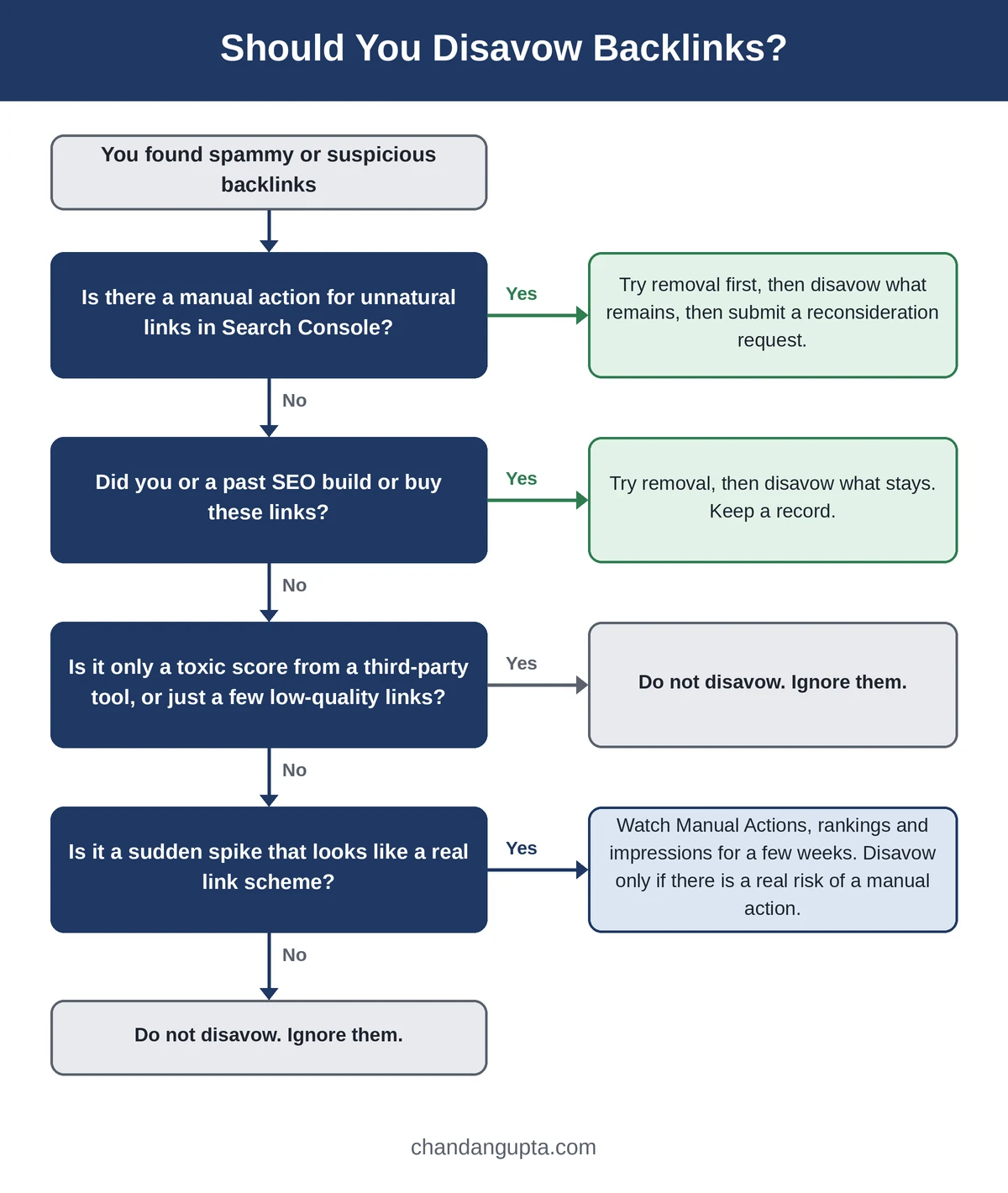
| Situation | What I do |
| Manual action for unnatural links | Try to get the links removed first. Disavow what is left, then submit a reconsideration request. |
| You or a past SEO built paid or manipulative links | Try removal, disavow the ones that stay, and keep a record of what was done. |
| Sudden spike of spammy links | Don’t react straight away. Check Manual Actions, watch rankings and Search Console, and look at whether the pattern points to a real link scheme. Disavow only if there is a genuine risk of a manual action. |
| A “toxic” score in a third-party tool | No action. The score is not Google’s opinion. |
| A few low-quality links | Ignore them. Every site has some. |
The spike case deserves a second look, because it is where most teams reach for the tool too fast. A sudden wave of junk links looks alarming in a backlink report, but alarming is not the same as harmful. Google’s own guidance points to random spam being ignored. So I treat a spike as something to watch, not something to fix on day one. I note the date it started, check Manual Actions, keep an eye on rankings and impressions for a few weeks, and act only if something actually moves.
How to disavow links properly
If you have worked through the checklist below and disavowing is justified, do it carefully. A sloppy file is worse than no file.
Build the file
- Use a plain text (.txt) file, encoded as UTF-8 or 7-bit ASCII, with one URL or domain per line.
- Write domain: before a domain to cover it and its subdomains. Use a full URL for a single page. You cannot disavow a subpath, such as a folder.
- Start a line with # to add a comment. Google ignores these lines, so use them to note why a link is there and when you asked for its removal.
- Stay under 100,000 lines (blank and comment lines count) and 2 MB.
A small example:
# Paid links from an old campaign, removal requested, no reply
domain:example-spam-site.com
Upload it in Search Console
- Open the disavow links tool in Search Console and select your property. You need to be an owner, and the tool does not support Domain properties.
- Upload the file. If it has errors, Google shows them straight away and your existing list stays in place, so you can fix the file and try again.
- Keep one master file. A new upload replaces the old list, so always add to the full list instead of uploading only the new links.
- Give it time. Google says it can take a few weeks to take effect, and disavowed links still show in the Links report.
If you have a manual action
- Ask the site owners to remove the links, and keep a record of every attempt.
- Disavow the links that remain.
- Submit a reconsideration request, explaining what you removed, what you disavowed and what evidence you have. Google’s own FAQ on the tool says you still need to file one if you received a manual action notice.
What I put in client reports instead
- Manual actions status, checked in Search Console
- New links worth having this month, with the referring domain and why it matters
- Referring domain trend and any change in anchor text patterns
- A spam note only when there is a real spike, with what I checked and what I decided
This tells the client what is happening to their site, which is more useful than a list of links nobody needed to act on. The technical side of that routine is in my Technical SEO Checklist, and the page-level side is in my On-Page SEO Checklist. When a new client comes in, I would rather spend the time on the basics first, and I list the most common ones in 7 SEO Mistakes I See on Every New Client Website.
Why this debate keeps coming back
The “Google gave us the tool” argument survives because it sounds reasonable, and opinion alone rarely beats a reasonable-sounding argument. Telling someone a habit is wrong does not change it. Pointing them to the source usually does.
If you lead an SEO team or manage client reporting, put Google’s documentation and the checklist below in front of people and ask one question: what problem does this file solve? People who work out the answer themselves change a practice faster than people who are told, and they can change it without losing face.
Quick checklist before you disavow
- Is there a manual action for unnatural links in Search Console?
- Did you, or a previous SEO, build these links?
- Have you tried to get them removed?
- Is your decision based on a real link-scheme pattern, not a third-party toxic score?
- Can you explain in one sentence what problem the file solves?
If you cannot answer yes to either of the first two, leave the tool alone.
Frequently asked questions
No. Google calls the tool an advanced feature, and it ignores random spammy links on its own. Use it when there is a manual action or a real link scheme you cannot clean up.
Google does not present it as a ranking tool. It exists to deal with manipulative links you cannot remove, mainly when a manual action is involved.
No. The links report shows a sample, which Google has said for a long time.
No. Toxic scores come from third-party tools. Google has advised against disavowing based on them.
Sources
- Disavow links to your site – Google Search Console Help
- A new tool to disavow links – Google Search Central Blog (2012)
- Google Does Not Show All Spammy Links In Search Console – Search Engine Roundtable

Chandan Gupta is an SEO expert with 15+ years of experience helping businesses improve search visibility. He specializes in technical SEO, local SEO, and on-page optimization. Read his full story →