
On September 24, Google added a new option to the Search type filter in Search Console: Multimodal. The Search Console multimodal filter shows how your pages perform when someone searches with an image, a photo or a screenshot instead of typing words.
If you manage several client sites like I do, this is worth ten minutes of your time this week. Not because it will change your strategy overnight, but because it is data you never had before. Here is what it shows, what it hides, and what I would do about it.
What Google actually announced
Google’s Search Central blog announced web multimodal Search performance reporting in Search Console on September 24, 2026. In simple words: searches that start with an image now get their own slice in the Performance report.
The new data shows up in two places: the Performance report for Search results, and the report for Generative AI features. Google says it is rolling out globally starting that day, and you will see the metrics only if your site is actually getting traffic from these searches.
One detail matters more than the rest. John Mueller clarified that this data was not previously in the counts. So this is new data in the report, not old traffic moved from one bucket to another.
What counts as a multimodal search
Google describes this as searches where people use images, such as with a smartphone camera. The data covers four entry points:
- Google Lens
- Circle to Search on Android
- Image uploads to Google Search
- The “Search this image” option in Chrome’s right-click menu
Search Engine Land also covered the rollout, if you want a second source.
Think of a customer who photographs a sofa in a friend’s house, or circles a jacket in an Instagram reel on their phone. No typing, no keyword. Google reads the image and shows web results. If your product page or blog post shows up there, that visit now has a home in Search Console.
In India, where most people search from Android phones, Lens and Circle to Search are not fringe features. I would not assume this traffic is small for e-commerce, furniture, fashion and food clients until I have checked.
How to find the filter
- Open Search Console and go to Performance → Search results.
- Click the Search type filter.
- Under Web, you will now see two options: Text-based and Multimodal (marked New).
- Select Multimodal and apply.
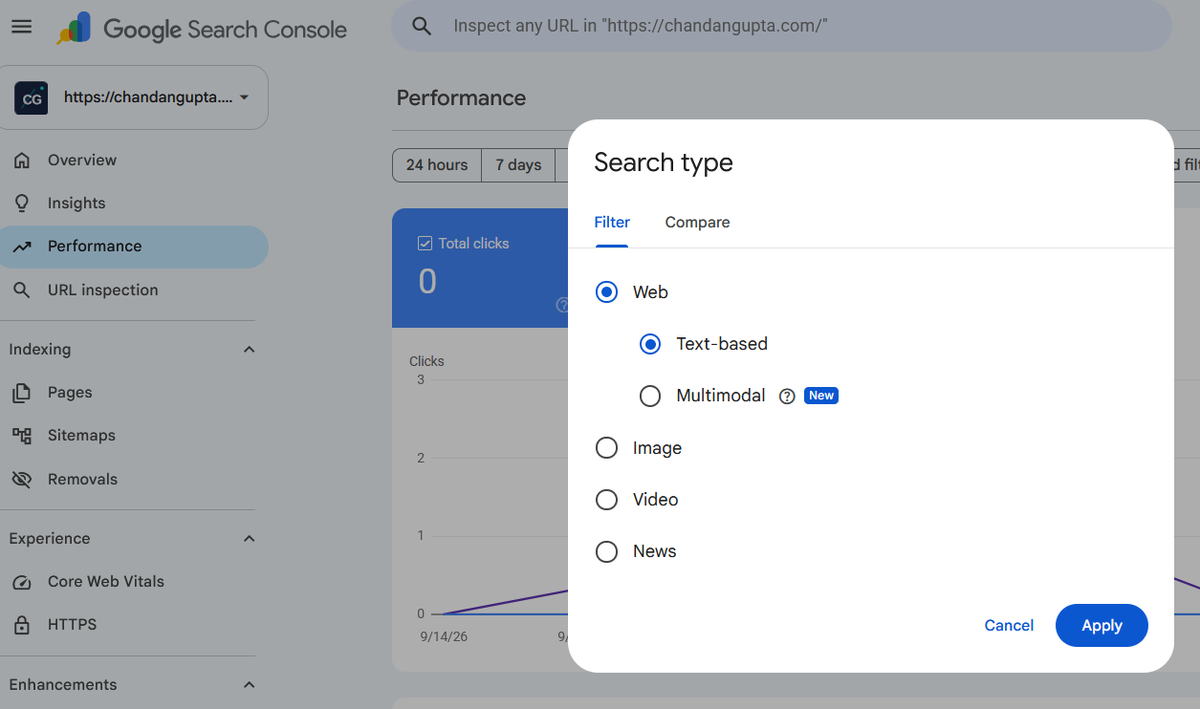
Set the date range to at least 3 months, like the screenshot in Google’s post, so you are not judging a few days of thin data.
I checked one of my e-commerce client accounts (name hidden), with the date range set to 3 months. The Multimodal filter showed data, and it starts in mid-September. So this traffic is real, and it was not in the reports before. That fits what Google said.
The big gap: no queries
Here is the catch. Because these searches mostly use images and not text, there is no query data for this traffic. The Queries dimension is not available when you filter by Multimodal.
So you can see which pages get the visits, but you cannot see what image or words triggered them. For an SEO used to building everything around keywords, this feels strange. You are looking at the result without the question.
The same client account showed this. With the Multimodal filter on, the Queries tab says “No query data for multimodal web search.”
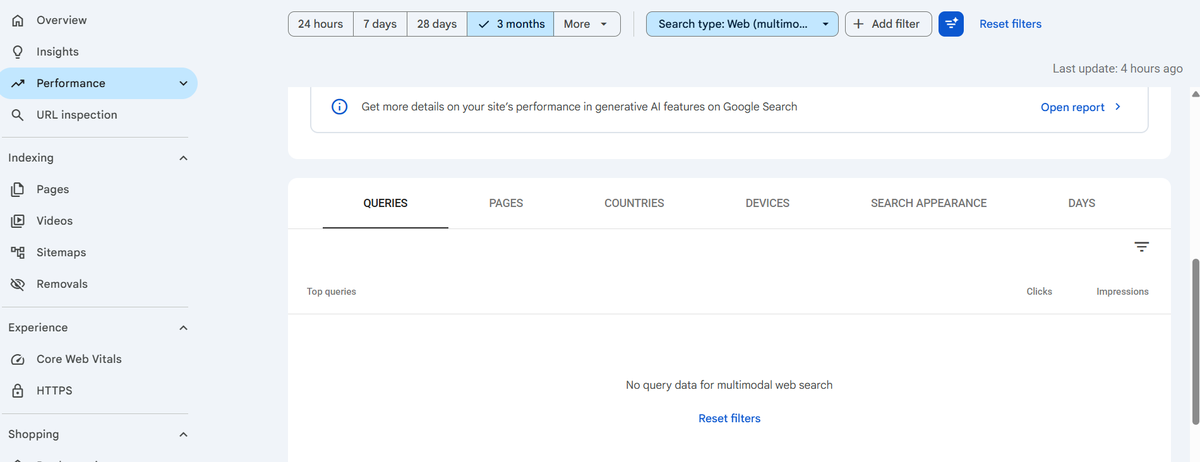
What you can work with is pages, countries, devices and dates, along with the usual clicks, impressions, CTR and position. That is still plenty for spotting patterns. Just double-check the exact dimensions on your own account, since I am reading them from reports on the launch and not from every property.
What about the API?
At the time of writing, reports say the Search Analytics API does not list a multimodal search type yet. Google’s post does not mention the API. It only says to click Export and analyze the data in your other tools.
If you run automated reports through Looker Studio or Sheets, expect a gap here until API support arrives. Check the API documentation before promising a client a dashboard.
What I would do this week
This is my own take, not official Google guidance.
1. Check every account that sells something visual.
Pick your e-commerce, fashion, home decor, jewellery, food and travel clients first. Text-heavy B2B sites are unlikely to show much.
2. Export the data now and save a baseline.
Because the API is missing, export from the interface. Save it in your client folder with the date. In three months you will be glad you have a starting point.
3. Look at pages, not keywords.
Sort by clicks and impressions and see which pages come up in image-based searches. Are they product pages? Blog posts with strong photos? Something you never expected? On the client account I checked, the top pages under this filter were all product pages. No blog posts, no category pages.
4. Audit the images on those pages.
Original, sharp photos. Descriptive file names. Proper alt text. Product schema where it fits. Nothing new here, but now you have a reason to prioritize it and a way to measure it.
5. Tell clients before they ask.
When a client notices a new filter, they will ask why there are no keywords. Have a one-line answer ready: “These are image-based searches, so Google does not give query data for them.”
What I would not do
I would not rebuild a content strategy around a filter that launched days ago. I would not promise clients a traffic jump. And I would not treat a small number as a trend before I have at least a few weeks of data.
I would also not assume the numbers on your other reports will stay the same. Since this is data that was not counted before, totals in some views may look different once it shows up. Check before you send the next monthly report, and note the change if a client compares month to month.
Why this matters more than it looks
For years, we optimized for the moment someone types words. That moment is not the only door anymore. People point a camera at something, circle it on a screen, or drop a photo into Google.
Search Console is finally giving us a way to see that door. The data is incomplete, but the direction is clear: visual content is part of search performance now, and it deserves a line in your monthly report.
After 15 years in SEO, I have learned to be careful with new features. Most are noise for a while. This one, though, costs nothing to check and gives real data on a growing behavior, so I would watch it.
If you’re auditing your site’s technical setup, my On-Page SEO Checklist 2026 covers everything from Core Web Vitals to AI search readiness.
FAQ
It is a new option under Search type in the Performance report. It shows how your pages perform in web results triggered by searches that use an image, photo or screenshot.
Google Lens, Circle to Search on Android, image uploads to Google Search, and Chrome’s “Search this image” right-click option.
These searches mostly use images and not text, so there is no text query to report. The Queries dimension is not available with this filter.
No. According to John Mueller, the data was not previously in the counts. The report has new data.
The rollout started globally on September 24, 2026, and reaches properties gradually. You will only see data if your site receives this kind of traffic.
Not yet, according to reports at launch. Use the Export button and analyze the file in your own tools.

Chandan Gupta is an SEO expert with 15+ years of experience helping businesses improve search visibility. He specializes in technical SEO, local SEO, and on-page optimization. Read his full story →