When I take on a new client website, I do not start with the content. I start by asking a more basic question: can Google reach this site, read it, and index the right pages?
If the answer is no, nothing else matters. The best-written page in the world will not rank if it is blocked in robots.txt, buried five clicks deep, or sitting behind a stray noindex tag. It is the reason technical problems feature so heavily in the 7 SEO mistakes I see on every new client website.
On a WordPress campaign recently, Google could barely reach the homepage: URL Inspection showed “Server error (5xx)” and Crawl Stats showed 87% of requests failing since 20 July. The cause was bad code in the .htaccess file, and the site started getting indexed again only after our team removed it.
This is the checklist I use for that first technical pass. It is the companion to my On-Page SEO Checklist 2026: on-page covers what is on the page, and this one covers whether the page can be found, rendered and trusted at all. I run it across campaigns for clients in the US, UK, Canada and Australia, and every check has a reason attached, so a junior auditor knows when it applies and when it does not.
How I run it (the order matters)
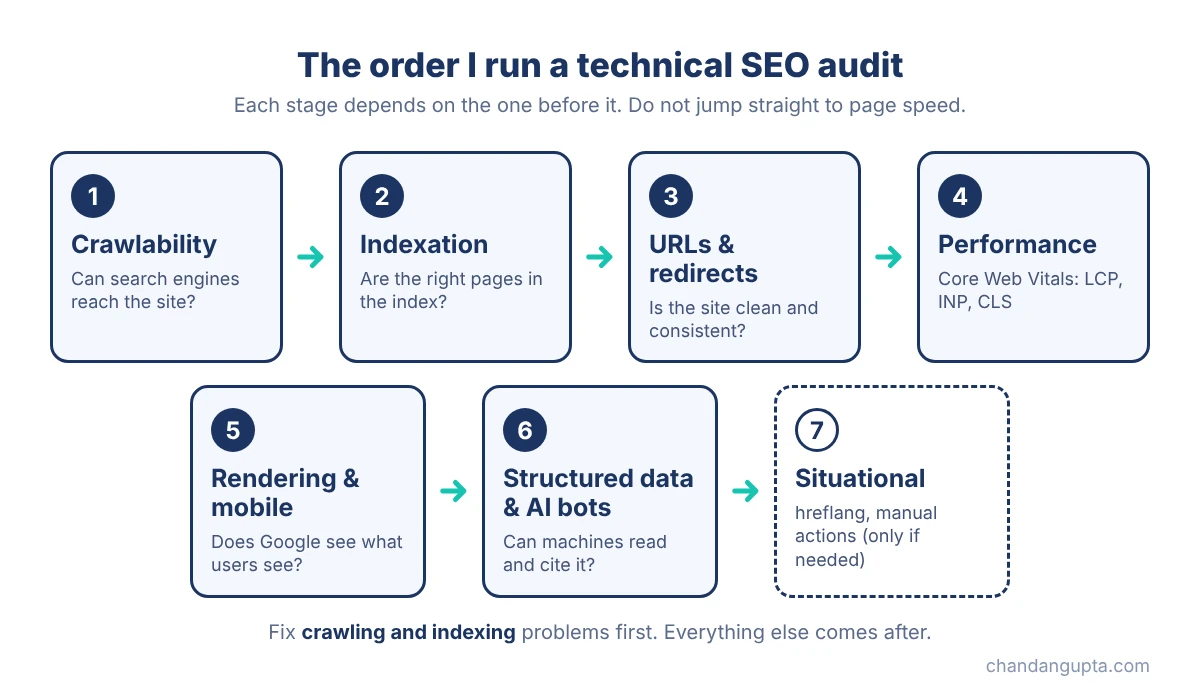
Technical audits go wrong when people jump straight to page speed. I work in this order, because each stage depends on the one before it:
- Crawlability: can search engines reach the site?
- Indexation: are the right pages in the index, and the wrong ones out?
- URLs and redirects: is the site consistent and clean?
- Performance: is it fast enough for real users?
- Rendering and mobile: does Google see what users see?
- Structured data and AI crawlers: can machines understand and cite it?
- Situational checks: only if the site needs them.
Tools: Google Search Console, a crawler such as Screaming Frog, PageSpeed Insights, and the Rich Results Test. Nothing exotic. The system matters more than the tool.
Crawlability
- robots.txt is not blocking important sections. Open /robots.txt and read every Disallow line. Check that CSS, JS, product folders and blog folders are not blocked by accident. Why it matters: one wrong line can hide an entire section from search, and it often survives a redesign or staging push.
- robots.txt is reachable and valid. It should return a 200 status, sit at the root, and stay reasonably small. Also remember that a noindex rule inside robots.txt is not supported by Google. Why it matters: a broken or unreachable file can cause crawling problems, and people still use robots.txt as if it controlled indexing. It does not.
- XML sitemap lists only pages you want indexed. Include only indexable, 200-status, canonical URLs. Submit it in Search Console and compare submitted vs indexed. Why it matters: a sitemap full of redirects, 404s and noindex pages tells Google your site is messy.
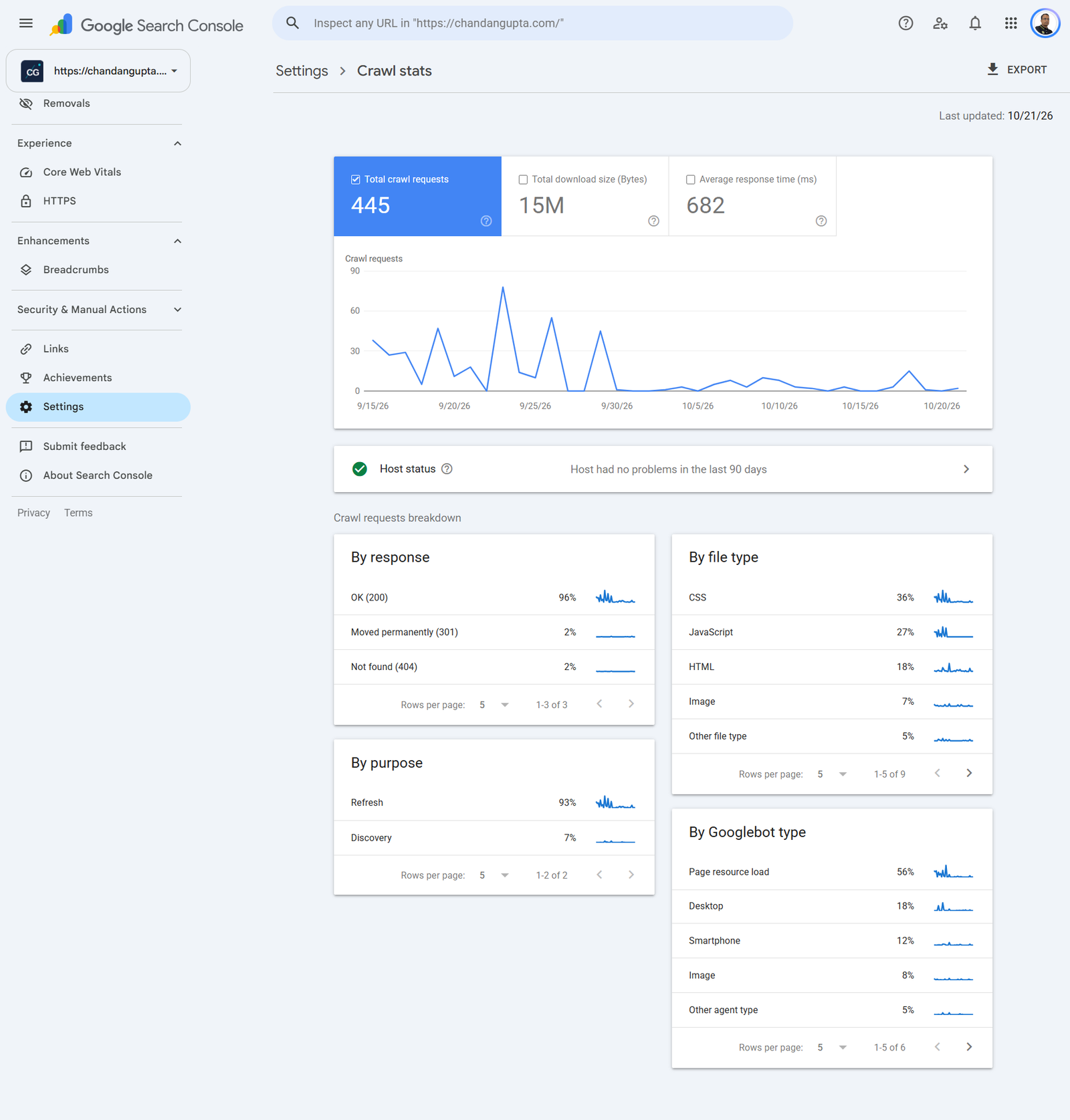
- Server errors and response time are healthy. In Search Console, open Settings > Crawl stats and look at 5xx errors, average response time and host status. Why it matters: if the server struggles, Google crawls less, and new content takes longer to appear.
- No orphan pages. Compare your crawl against the sitemap and analytics data to find pages that have no internal links pointing to them. Why it matters: a page with no internal links is hard to discover and gets little authority, however good it is.
- Important pages are close to the homepage. Check click depth in your crawler. Key service, product and category pages should be a few clicks away at most. Why it matters: depth is a signal of importance, and deep pages are crawled less often.
Indexation
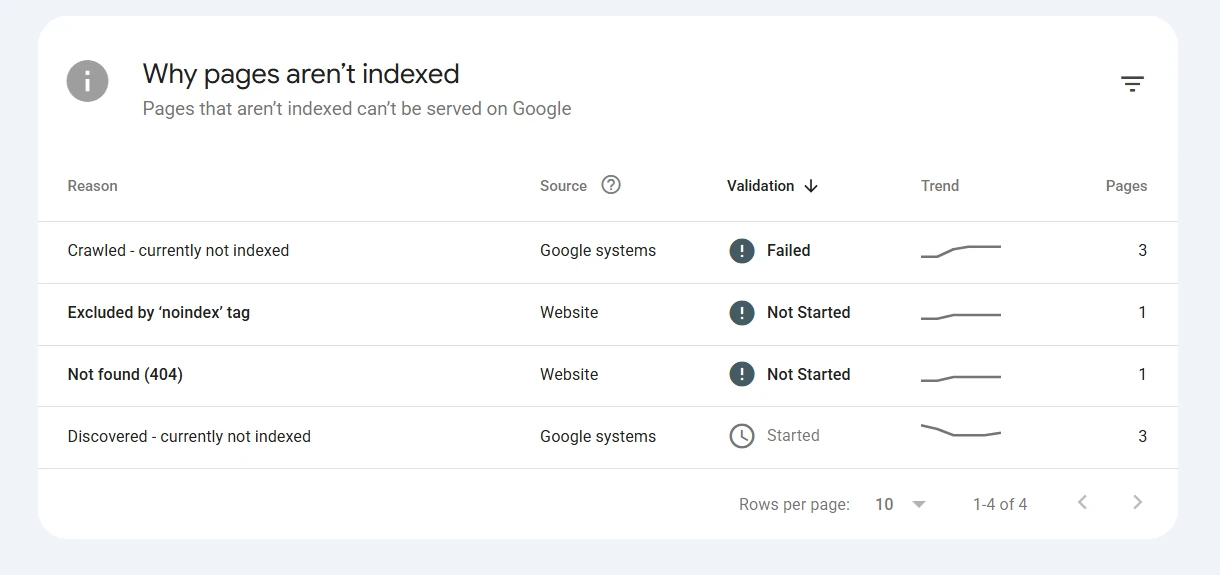
- Page indexing report reviewed. In Search Console, go through every reason pages are not indexed, such as Crawled – currently not indexed, Discovered – currently not indexed, Duplicate without user-selected canonical, and Excluded by noindex. Why it matters: this report tells you which exclusions are intentional and which are costing you traffic.
- Canonical tags are present and consistent. Each indexable page should have a self-referencing canonical, and the canonical should match the sitemap and internal links. Why it matters: conflicting signals force Google to guess which URL to rank.
- No accidental noindex. Check meta robots tags and X-Robots-Tag headers, especially on templates, category pages and anything that went live from a staging site. Why it matters: a leftover noindex from development is one of the most common and most expensive technical mistakes.
- One version of the site, not four. http, https, www and non-www should all redirect to a single preferred version, with consistent trailing slashes. Why it matters: otherwise the same page exists at several URLs and splits its signals.
- Parameter and faceted URLs are controlled. Filters, sorting and tracking parameters should use canonicals, noindex or sensible internal linking so they do not create thousands of near-duplicate pages. Why it matters: these pages waste crawl time and can bury the pages that matter.
- Soft 404s and thin pages are dealt with. Look for empty category pages, out-of-stock pages and placeholder content that return a 200 status but have nothing useful on them. Why it matters: Google treats them as low quality, and they drag down how the whole site is assessed.
URLs and redirects
- No redirect chains or loops. Crawl the site and check that internal links point to the final URL, not to a URL that redirects to another one. Why it matters: chains slow users and crawlers down, and loops break pages completely.
- Permanent moves use 301 (or 308), not 302. Audit redirect types, especially after a migration or CMS change. Why it matters: a temporary redirect used for a permanent move can leave the old URL in the index for longer than you want.
- Internal links return 200. Fix or remove internal links that lead to 404s or redirects, and check that your custom 404 page returns a real 404 status. Why it matters: broken internal links waste crawl budget and send users to dead ends.
- URL structure is clean and stable. Short, readable, lowercase URLs with no session IDs or unnecessary parameters. Avoid changing URLs without a redirect plan. Why it matters: every URL change is a risk, and every messy URL is a duplicate waiting to happen.
- HTTPS everywhere, with no mixed content. Check that the certificate is valid, all pages load over HTTPS, and no images, scripts or CSS still load over HTTP. Why it matters: mixed content triggers browser warnings and weakens user trust.
Performance (Core Web Vitals)
- LCP is within the good range. Aim for a Largest Contentful Paint of 2.5 seconds or less on mobile. Check the hero image, server response time and render-blocking resources. Why it matters: this is the loading experience users actually feel.
- INP is within the good range. Aim for Interaction to Next Paint of 200 milliseconds or less. INP replaced FID as the responsiveness metric in March 2024, so any checklist that still says FID is out of date. Heavy JavaScript and third-party scripts are the usual cause. Why it matters: slow interactions frustrate users, and many sites still fail this metric.
- CLS is within the good range. Aim for a Cumulative Layout Shift of 0.1 or less. Set image dimensions, reserve space for ads and embeds, and be careful with late-loading fonts. Why it matters: layout jumps cause misclicks and make a site feel unreliable.
- Field data comes before lab data. Use the Core Web Vitals report in Search Console and the field data in PageSpeed Insights first. Treat a Lighthouse score as a diagnostic, not the goal. Why it matters: real-user data is what counts, and a 100 in the lab can still hide a poor experience.
- The basics of delivery are in place. Compression, browser caching, modern image formats, correctly sized images, and a CDN where it makes sense. Why it matters: these are the fixes that usually give the biggest gains for the least effort.
Rendering and mobile
- Key content appears in the rendered HTML. Use the URL Inspection tool and view the rendered page. Check that main content, internal links and canonical tags are present after rendering, and not only in the browser. Why it matters: if Google cannot see it after rendering, it cannot rank it.
- The mobile version matches the desktop version. Compare content, headings, internal links, structured data and meta tags across both. Google uses the mobile version for indexing. Why it matters: anything hidden or removed on mobile may never be indexed.
- Lazy loading does not hide content. Images and sections that load on scroll should still be discoverable by crawlers, and the main image should not be lazy-loaded. Why it matters: lazy loading done wrong delays your LCP and hides content from search.
Structured data and AI crawlers
- Schema is valid and matches the page. Test with the Rich Results Test and the Schema Markup Validator. Check that every marked-up detail is actually visible on the page, and be aware that Google now limits FAQ rich results to a small set of sites. Why it matters: invalid or misleading markup earns nothing, and it can put eligibility at risk.
- AI crawler rules are a deliberate decision. Decide, per bot, whether to allow or block crawlers such as GPTBot, Google-Extended and PerplexityBot, and write it into robots.txt on purpose. I explain the thinking in my on-page checklist post. Why it matters: this is a business decision, not a default. Blocking everything and allowing everything are both choices with consequences.
- Key content is available without relying on JavaScript. View the page source or fetch the raw HTML. Core text and links should be in the initial HTML wherever possible. Why it matters: some crawlers, including some AI ones, may not run JavaScript, so server-rendered content is the safer option.
Situational checks
- hreflang is correct (international sites only). Check that language and region codes are valid, each page references itself, and the tags are reciprocal. Why it matters: hreflang errors are common, and they send users to the wrong version of a page.
- Manual actions and security issues are clear. In Search Console, check Manual actions and Security issues. For hacked or malware-affected sites, also scan for injected pages and links. Why it matters: these override everything else on this list, so they are worth a thirty-second check on every audit. If the report shows a manual action for unnatural links, read when to use the Google disavow tool before you upload anything.
How I turn the checklist into a report
Running the checks is the easy part. What clients and colleagues need is a decision, so I sort every finding into one of three buckets:
- Fix now: anything that blocks crawling or indexing (robots.txt, noindex, broken canonicals, server errors).
- Fix this month: redirect cleanup, Core Web Vitals, schema errors, duplicate URL handling.
- Monitor: minor warnings and situational items that are not hurting performance yet.
If you use AI tools to help with an audit, verify the output before it goes anywhere near a client. I wrote about why in Can AI Replace Manual SEO?. Tools miss schema, read cached pages and skip checks.
What I would not do
I would not chase a perfect Lighthouse score while the site has indexation problems. I would not copy a 200-point audit into a client report just to make it look thorough. And I would not run a technical audit once and forget it: set a recurring check on robots.txt, the sitemap and the Page indexing report, because the most damaging technical problems usually appear right after a redesign, a migration or a plugin update.
Google also keeps changing what Search Console shows you. When it adds something new, like the filter I covered in my Search Console multimodal filter post, it is worth folding into your routine.
FAQ
Crawlability and indexation. If search engines cannot reach or index your pages, nothing else on the site can perform, so I always check those first.
A full audit at least once a year, and a quick check of robots.txt, sitemap, Page indexing and Core Web Vitals every month. Run an extra one after any redesign, migration or major plugin change.
Yes, as part of Google’s page experience signals, though it is not the strongest one. Great content on a slow site can still rank, but a slow, unstable site makes everything harder, and users notice it long before rankings do.
No. Google Search Console, PageSpeed Insights and the Rich Results Test are free. A crawler like Screaming Frog is useful for larger sites, and its free version handles smaller ones.
Yes. AI systems rely on pages that are crawlable, indexable and clearly structured. Technical problems that stop Google from reading a page also stop it being used as a source.
News sites publish fast, so crawling and speed matter most. On top of the standard checks, keep the XML sitemap updating automatically, add NewsArticle schema with accurate dates, control tag and archive pages that create duplicates, and stop ads from causing layout shifts. Check how quickly new posts get indexed in Search Console.
Start with four checks: can Google reach the site (robots.txt), is it indexed (Page indexing report in Search Console), does every page have one clean URL (canonicals and HTTPS), and does it load fast on mobile. Fix those before touching anything else. Free tools are enough: Search Console and PageSpeed Insights.
Get This Checklist as a Free PDF
Enter your email to download the 30-point Technical SEO Checklist as a PDF you can use on your next audit.

Chandan Gupta is an SEO expert with 15+ years of experience helping businesses improve search visibility. He specializes in technical SEO, local SEO, and on-page optimization. Read his full story →